- Apart from this, you can also use the keyboard shortcut, ‘Ctrl + ;’ to switch back to a normal chat again or to the incognito mode.
- However, it does state that the chat won’t appear in the history or would be used to train the model.
- Similar to ChatGPT, you would be informed that your chats would not appear in your history and would not be used to train the model.
The core reason LLMs, or large language models such as ChatGPT and Gemini, work the way they do is the amount of data they are trained on. Every conversation you have with it or the data you feed into it is used to further train it. This also instils a fear of privacy concerns among users. As one would not like a record of sensitive or personal information in particular. For this, almost every platform offers a private mode. Let’s explore how you can access them and how it really works.
Using Private Mode on LLM Platforms
Using an LLM platform is much like using a search engine, albeit with a lot more capabilities. You must have noticed that when you do a normal Google search, it adds to your browsing history. The links you have already visited would appear purple. Similarly, these platforms not only keep a record of your chats with them but also use that data to train themselves further. Like all browsers, these platforms also offer private or incognito chat. This is how you can access these modes in ChatGPT, Gemini, Grok, Perplexity, and Claude AI.
1. ChatGPT
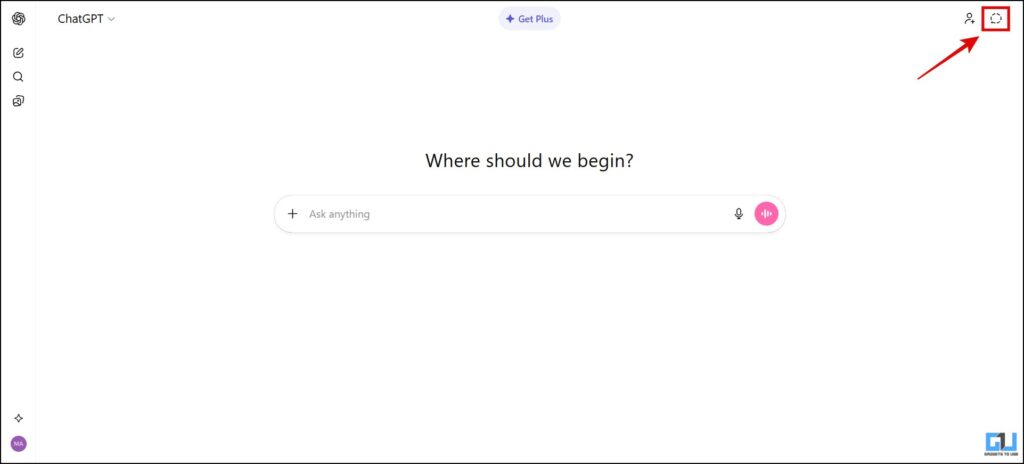
Once you open ChatGPT, you will see “Turn on temporary chat” in the top-right corner.
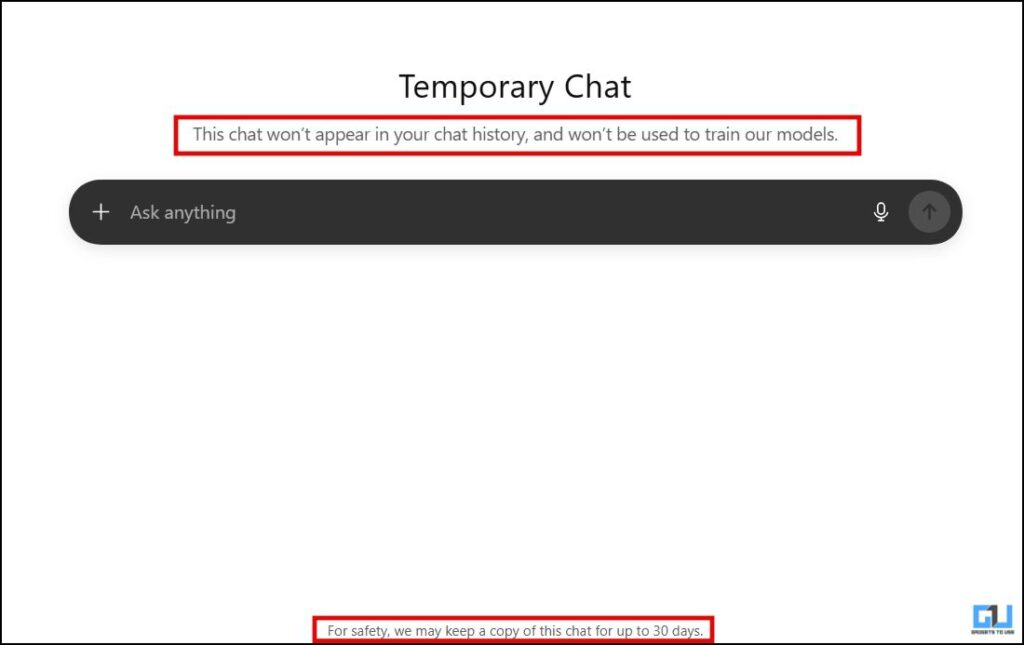
Here, you will clearly see a disclaimer saying, “This chat won’t appear in your chat history and won’t be used to train our models”. But you have to keep in mind that the chat won’t be instantly deleted from the servers. As stated by the platform, a copy of the chat may be kept for up to 30 days for safety concerns.
2. Gemini
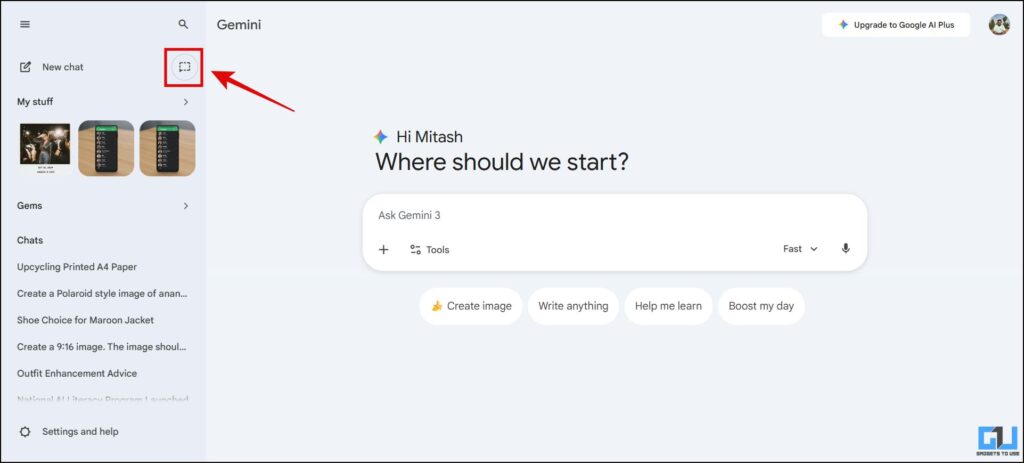
After opening Gemini, on the left of your screen, click on the ‘Temporary chat’ icon beside the ‘New chat’ icon. If you don’t see it, you can expand the sidebar menu to make it visible.
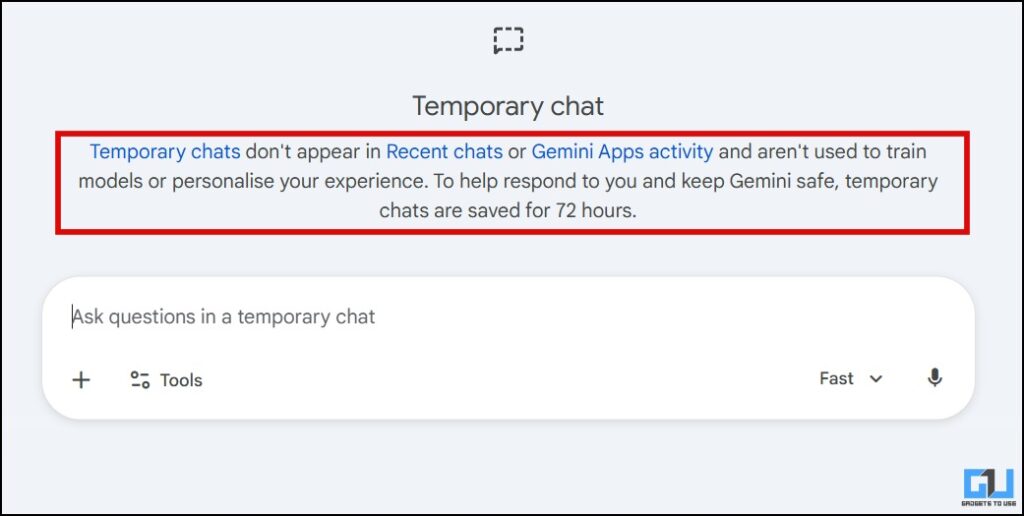
Similar to ChatGPT, you would be informed that your chats would not appear in your history and would not be used to train the model. You will also see that it is clearly stated that the record will be kept for only 72 hours or 3 days for safety reasons.
3. Grok
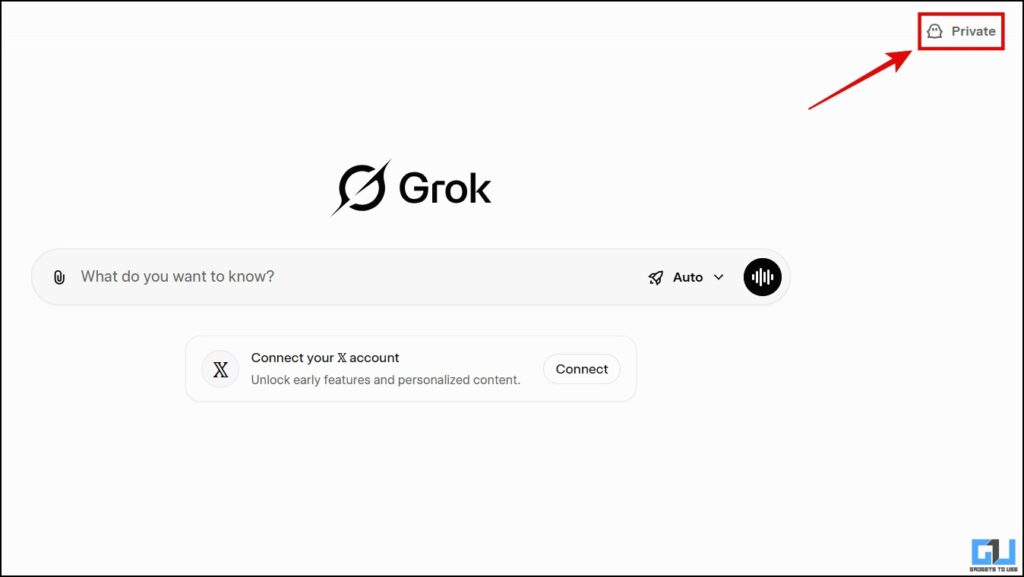
Open Grok, then click “Private” in the top-right corner.
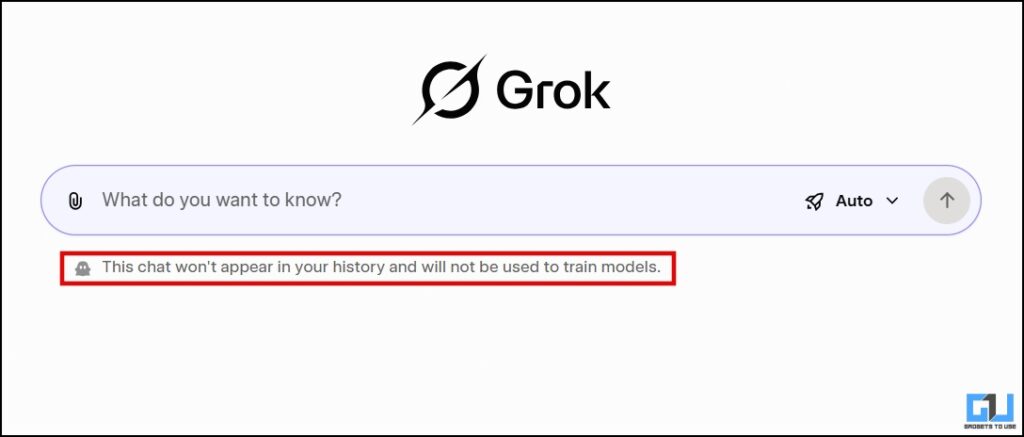
You can have a private chat now. Unlike the platforms above, Grok does not explicitly state whether chat will be stored, and if so, for how long. However, it does state that the chat won’t appear in the history or would be used to train the model.
4. Perplexity
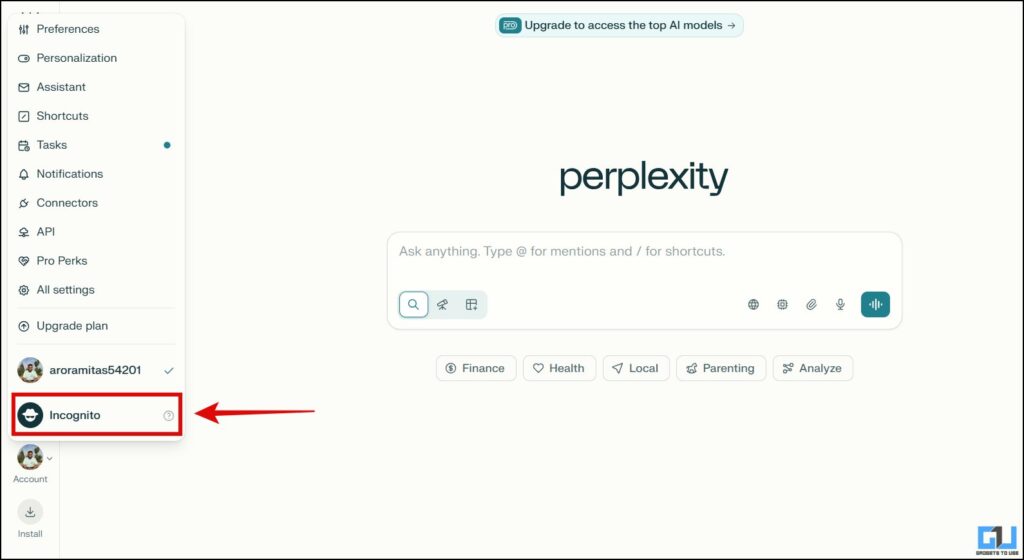
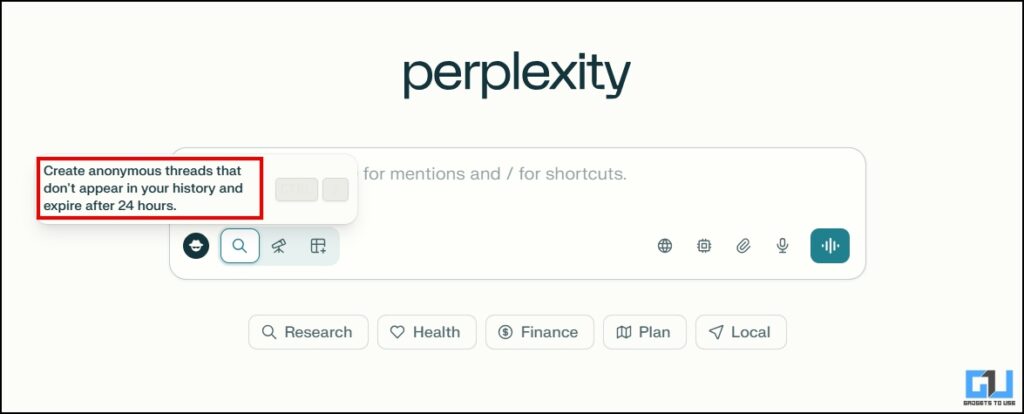
Once you open Perplexity, click on your account in the bottom left corner. A menu will pop up where, at the bottom, you will see the ‘Incognito’ option. Click that. Apart from this, you can also use the keyboard shortcut, ‘Ctrl + ;’ to switch back to a normal chat again or to the incognito mode.
In this too the chats would not appear in the history and data will be deleted within 24 hours, as mentioned by Perplexity.
5. Claude AI
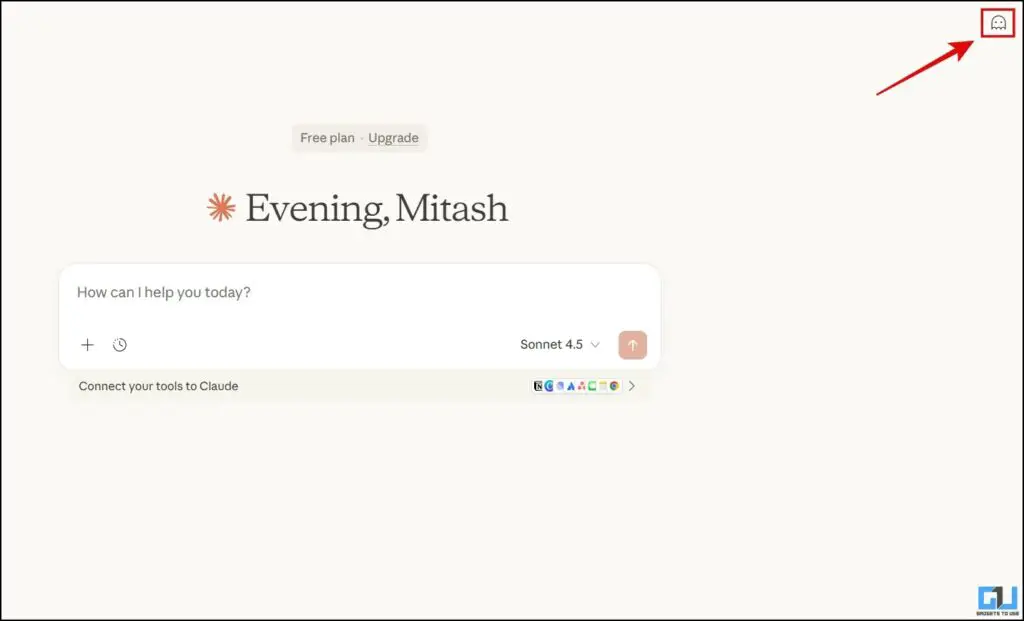
After opening Claude AI, you will find the incognito option in the top-right corner. Or, you can simply use the ‘Ctrl + Shift + I’ keyboard shortcut.
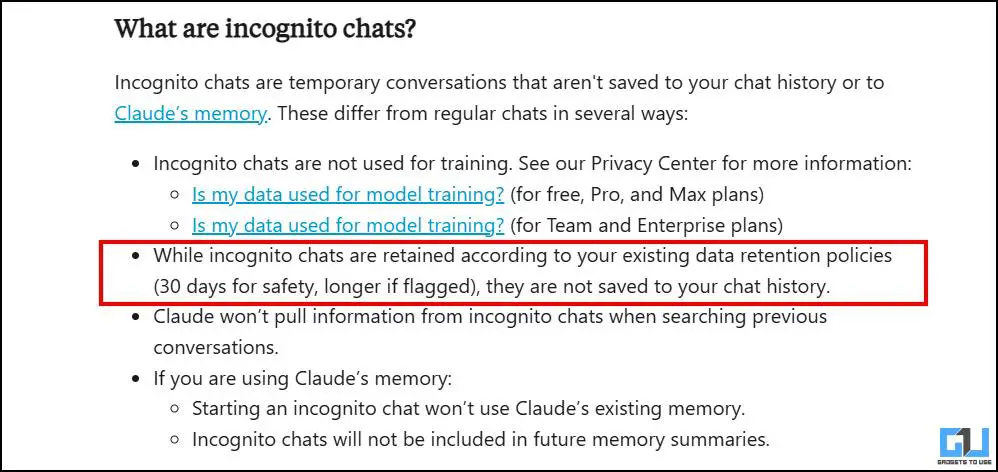
Although Claude doesn’t mention how long, the chats will be retained, apart from not appearing in the history. I looked for it in Claude Support and found the following.
FAQs
Q. Can I use the private mode without logging in?
Private modes are not needed and thus not accessible when not logged in. Your chat will not be saved anywhere once you close the window but they might be utilised later to train the model.
Q. Can I land in legal trouble through my chats in private mode?
Not unless it’s something flagged by the system. As mentioned above, these chats are not immediately wiped off. Each platform has policies aligned with the laws of the respective nations that direct them to grant authorities access to these chats in the event of an issue.
Wrapping Up
Unlike normal mode on LLM platforms, private mode lets you chat without creating a history or training the model. While this is a useful feature when multiple users use a single account, it should be used with caution. Users should avoid sharing sensitive information such as passwords, addresses, or contact details. Additionally, this mode should be used considering that any information which may potentially be related to illegal activities can call for the involvement of legal authorities if needed. There is a system in place to flag any such conversation within all platforms.
You should also check out:
Have any questions related to our how-to guides, or anything in the world of technology? Check out our new GadgetsToUse AI Chatbot for free, powered by ChatGPT.
You can also follow us for instant tech news at Google News or for tips and tricks, smartphones & gadgets reviews, join the GadgetsToUse Telegram Group, or subscribe to the GadgetsToUse Youtube Channel for the latest review videos.
Was this article helpful?
YesNo