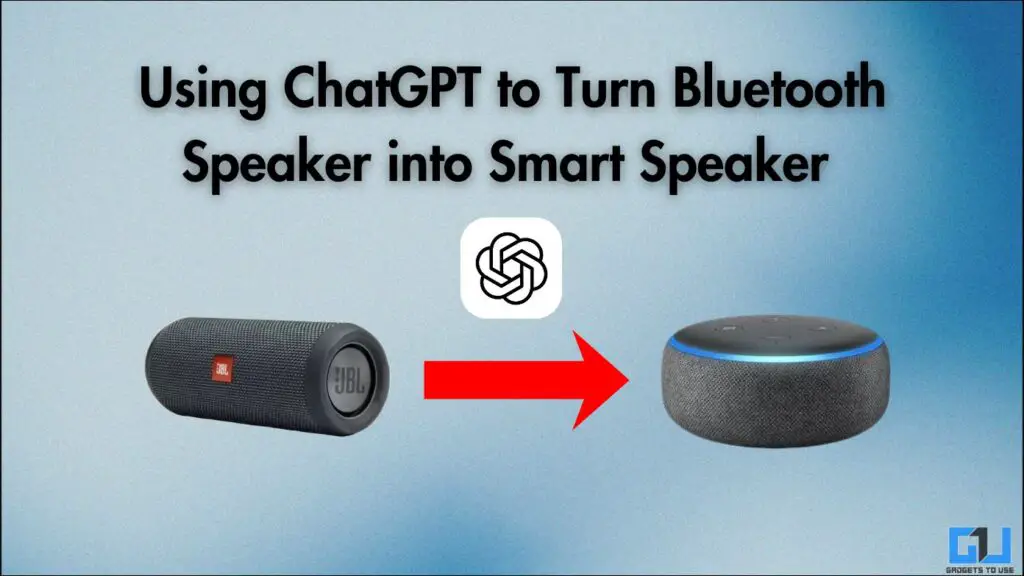
- You can use it in the kitchen to assist you with tips and doubts while cooking, or you can converse with it, ask questions about a ton of things.
- Using it through a Bluetooth speaker helps in taking it beyond the phone screen and turning it into a full-fledged assistant that can be used from anywhere.
- After tinkering for a while, I figured out a way to bring ChatGPT to any wireless speaker, in the same conversational and chatty format using voice commands.
I have been using Google Home and Amazon Alexa-powered speakers for a long time, but with the emergence of AI chatbots like ChatGPT and Gemini, these have started to feel less effective. Although Google has upgraded its smart speakers with Gemini, it left me thinking, how difficult is it to integrate an AI chatbot with a regular Bluetooth speaker?
After tinkering for a while, I figured out a way to bring ChatGPT to any wireless speaker, in the same conversational and chatty format using voice commands. Here’s a quick guide on how you can do it.
Turn a Bluetooth Speaker Into a Voice-Controlled Assistant
1. Connect your phone to a Bluetooth speaker, and make sure to use one with an inbuilt mic.
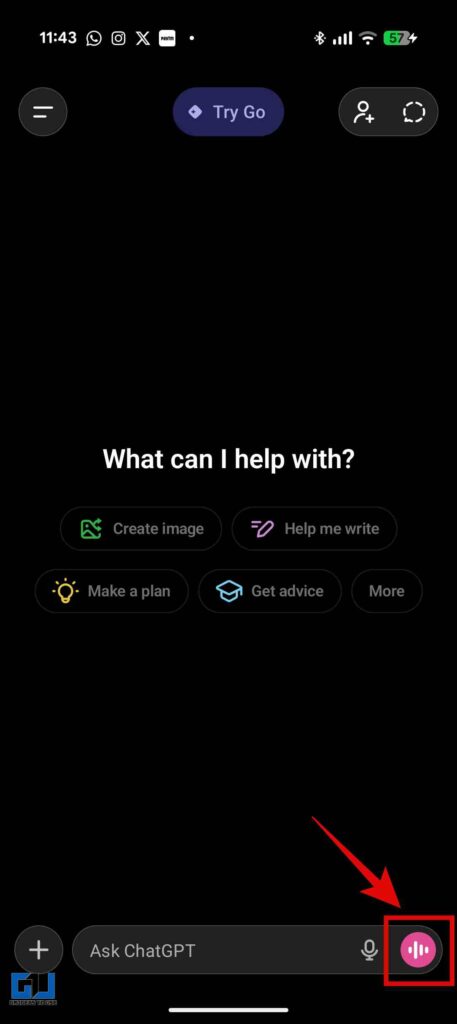
2. Once connected, open the ChatGPT app and go to a new chat. Then tap the live button in the bottom right corner.
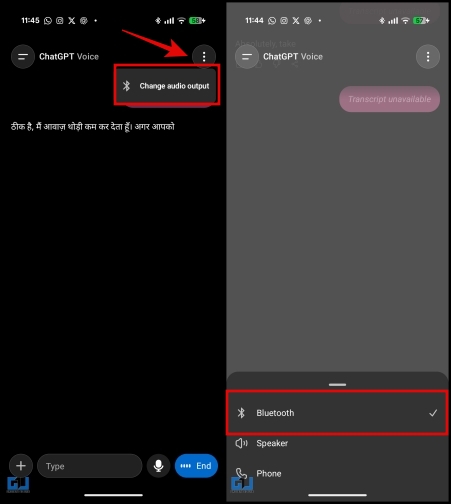
3. You can make sure that the audio output is via the Bluetooth device. Tap the three dots in the top right corner, and ensure that the output device is selected as your wireless speaker.
Here are some creative ways of using this ChatGPT-powered speaker in the real world:
1. Using it as a Voice-controlled assistant
It can easily be integrated into your day-to-day life as something like Alexa would do. You can use it in the kitchen to assist you with tips and doubts while cooking, or you can converse with it, ask questions about a ton of things. It can guide with workouts, help in study sessions, learning new skills, and a lot more. It can be of use to people who don’t own smart speakers. If I talk about myself, I recently used it as a companion to bounce off ideas while brainstorming for content. It really helped me build a structure out of the randomness of the ideas.
2. Learning Buddy for Kids
When children start to speak, there comes a time when all they want to do is talk and ask questions. And honestly, that is the core use of ChatGPT: it answers questions. Children can chat with ChatGPT without having to interact through a screen, as we know,+ the less screen time, the better. They can use it for help with their homework, getting to know fun facts through riddles, quizzes. It can also do storytelling for children. It can be a great learning companion.
3. Personal Travel Guide
Often, while travelling, you must have felt lost and unsure of what to look for and where to go exactly. This can be used as a personal travel guide on the go. You can use it as if you are on a call with a guide. History, local food recommendations, hidden spots, and quick translations – it can help you with almost everything. However, it is recommended to use earbuds or neckband earphones to maintain privacy while travelling.
4. Interactive Booths at Exhibitions
This also allows exhibitors to set up Q&A stations with minimal hardware requirements. Visitors can ask questions and request for product demos. Multi-language support is also possible with minimal effort in international events. This is a cost-effective way to make kiosks interactive.
Why Does This Matter
The ChatGPT live feature, apart from the uses mentioned above, does have a lot more possibilities. Using it through a Bluetooth speaker helps in taking it beyond the phone screen and turning it into a full-fledged assistant that can be used from anywhere. This is also feasible, as most people own a Bluetooth speaker, and no extra hardware is required to make it work.
FAQs
Q. Can ChatGPT play songs from streaming platforms like Spotify?
No, ChatGPT Live cannot play music through streaming platforms like Alexa can.
Q. Does this work on a speaker without a mic?
You cannot integrate ChatGPT in your wireless speaker if it does not have a mic, as it is necessary for two-way communication.
Wrapping Up
It is a reality that AI has become an integral part of how we live our lives. And by using this simple trick we can utilise it in cooking, learning, vacations, work and much more. However, it might not have all the functionalities as a smart speaker, but it’s great for how accessible it is. I personally use it regularly to get help and guidance in many day-to-day tasks. It’s convenient and just feels like talking to a normal person. You should really give it a go and explore more ways that it can be made use of.
You may also like to read:
Have any questions related to our how-to guides, or anything in the world of technology? Check out our new GadgetsToUse AI Chatbot for free, powered by ChatGPT.
You can also follow us for instant tech news at Google News or for tips and tricks, smartphones & gadgets reviews, join the GadgetsToUse Telegram Group, or subscribe to the GadgetsToUse Youtube Channel for the latest review videos.
Was this article helpful?
YesNo