- Just upload or take a photo and give a prompt according to the changes you want to make.
- Oftentimes, you might go to restaurants where you wouldn’t understand the dishes on the menu due to a linguistic difference.
- Also, keep in mind that the current limit is 3 per day for the number of times you can use the tool.
For the past year or two, smartphone brands have focused heavily on AI features. This is one area where Android has been leading as of now, given the state of Apple Intelligence in iOS. Almost all UIs, such as One UI, Oxygen OS, Pixel UI, or even Origin OS, have provided their users with a ton of AI features. In this article, we’ll explore one such exciting AI feature in Oxygen OS, called AI PlayLab. This will allow you to convert your static photos into fun videos, along with other useful bonus features.
What is AI PlayLab?
AI PlayLab is a recently launched app from OnePlus. It is an experimental tool that offers interesting AI features on your device. Along with other new features in the latest Oxygen 16, this is one of the main highlights. The application might come pre-installed in a newer OnePlus device. If you have an older device, you can also download it directly from the Google Play Store.
How to Turn Your Photo Into a Fun Video?
Once you have installed the app, open it and follow the steps below:
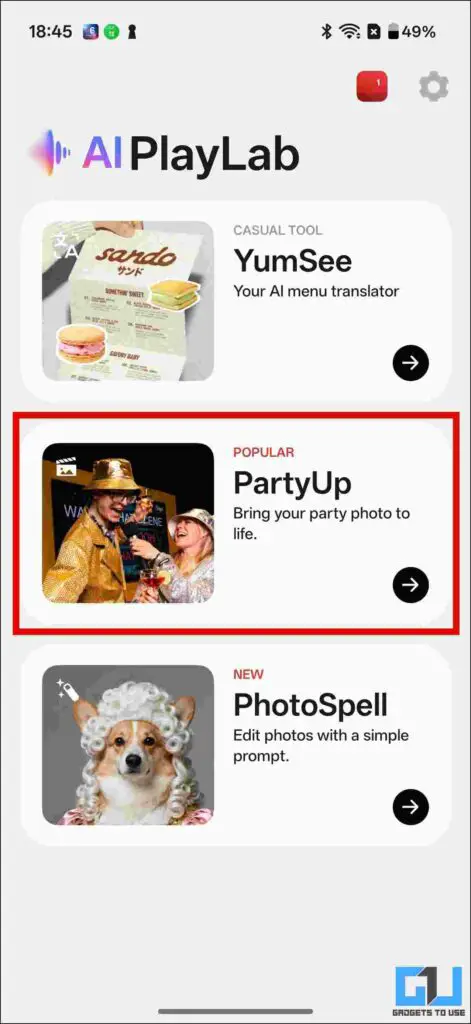
1. You would see a bunch of tools. Tap the ‘PartyUp’ tool.
2. Tap on ‘Upload or take photo’. Here, you can choose whether to upload a photo from your gallery or take one instantly. I chose the ‘Upload photo’ option.
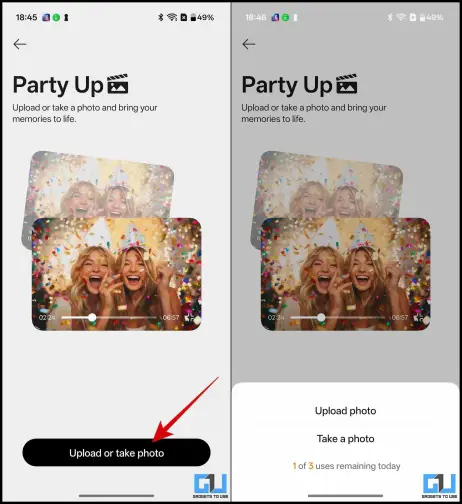
3. Once you have selected the photo, you can adjust the video’s frame and orientation.

4. There are many preset modes, each with a different effect. You can choose any one. Once you have chosen, hit ‘Generate’. The processing will take about 2 minutes.
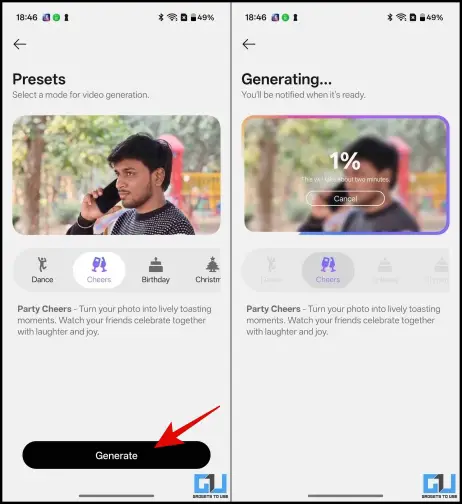
5. Once processing is complete, you will see that the video has been created. You can rename it and also download it to share it on social media or with your friends.
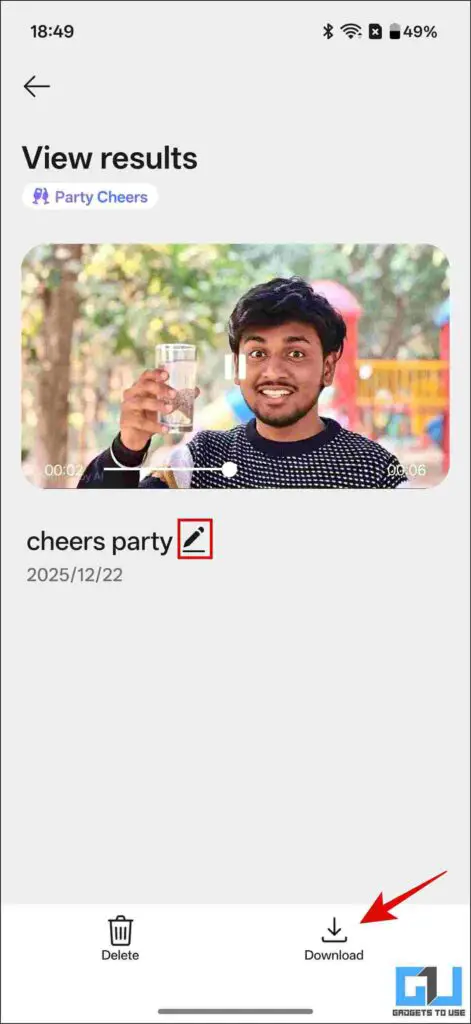
Also, keep in mind that the current limit is 3 per day for the number of times you can use the tool.
Along with the PartyUp Tool, you can explore other tools available in the AI PlayLab app.
YumSee: This can be a great tool if you travel a lot. Oftentimes, you might go to restaurants where you wouldn’t understand the dishes on the menu due to a linguistic difference. Simply upload or click a picture of the menu to use this. The tool will not only translate the menu but also generate a visual representation of the dishes. This would enable you to get a reference for what the dish would look like. You can also convert the local prices to your desired currency to get an idea of how much you’ll be spending.
PhotoSpell: This is an AI photo editing tool that lets you edit your photos using prompts. One such example is that you can change the clothes you’re wearing or even add accessories. Just upload or take a photo and give a prompt according to the changes you want to make. Although other UIs also offer a similar feature, this can be a fun or useful tool you should try.
FAQs
Q. Will AI PlayLab work in all OnePlus phones?
This feature was released alongside the launch of Oxygen OS 16, the latest version. So as of now this work only work on devices running on that. It may work on Oxygen OS 15, but the features would be limited.
Q. Are there any other brands that offer a similar feature?
Yes, as we know, Oxygen OS and Color OS have many overlapping features. So this would also work in OPPO phones running on the latest Color OS 16.
Wrapping Up
As discussed above, Android smartphone brands are offering AI tools and features as a selling point. Every brand is trying to come up with something new or trying to bring their own version of something that has worked for some other brand. While some users might find utility in these tools, others may not find it relevant for them. In my opinion, some of these features do enhance user experience, but others are the ones which a user would use for 1-2 times for fun and then forget about it. However, one should definitely try it if they have the access and make their judgement accordingly.
You may also like to read:
Have any questions related to our how-to guides, or anything in the world of technology? Check out our new GadgetsToUse AI Chatbot for free, powered by ChatGPT.
You can also follow us for instant tech news at Google News or for tips and tricks, smartphones & gadgets reviews, join the GadgetsToUse Telegram Group, or subscribe to the GadgetsToUse Youtube Channel for the latest review videos.
Was this article helpful?
YesNo