Introduction
Microsoft has set November 10, 2026, as the end of support date for .NET 8. After that date, Microsoft will stop releasing security patches, bug fixes, and runtime updates for the version. So, for teams that are currently running workloads on .NET 8 LTS, this is an important deadline to plan the migration and schedule the execution.
This guide walks CTOs and engineering leads through the steps required to prepare for .NET 8 end of life without causing downtime or delivery slowdowns.
What .NET 8 End of Life Means for Your Production Workloads
Before jumping into the steps, it is worth understanding what end of support actually means in practice.
Once .NET 8 hits end of life, your applications will continue to run. That part does not change. What changes is how safe it is to keep running them.
Microsoft stops releasing security patches. Any CVE discovered after November 10, 2026, will go unpatched for .NET 8. For regulated industries like finance, healthcare, and government, running an unsupported runtime often violates compliance frameworks such as SOC 2, HIPAA, and PCI DSS. Over time, third-party library maintainers also drop support for older target frameworks, which means NuGet updates will gradually stop targeting net8.0.
Moreover, the business cost of staying on .NET 8 past this deadline gets expensive with time: security audits start failing, vendor reviews get stalled, and you get hit with growing technical debt that gets harder to pay down with every release cycle.
|
Area
|
What Changes on Nov 10, 2026
|
Business Impact
|
|
Security patches
|
Microsoft stops shipping CVE fixes
|
Unpatched vulnerabilities in production
|
|
Runtime updates
|
No bug fixes or stability patches
|
Risk of unresolved production issues
|
|
Compliance posture
|
Unsupported runtime flagged in audits
|
SOC 2, HIPAA, PCI DSS findings
|
|
Third-party NuGet packages
|
Maintainers gradually drop the
|
Forced dependency swaps under pressure
|
|
Azure hosted services
|
Azure App Service / Functions phase out .NET 8 runtime
|
Deployments start failing
|
|
Vendor/client reviews
|
Security questionnaires flag unsupported stack
|
Deals get stalled, renewals delayed
|
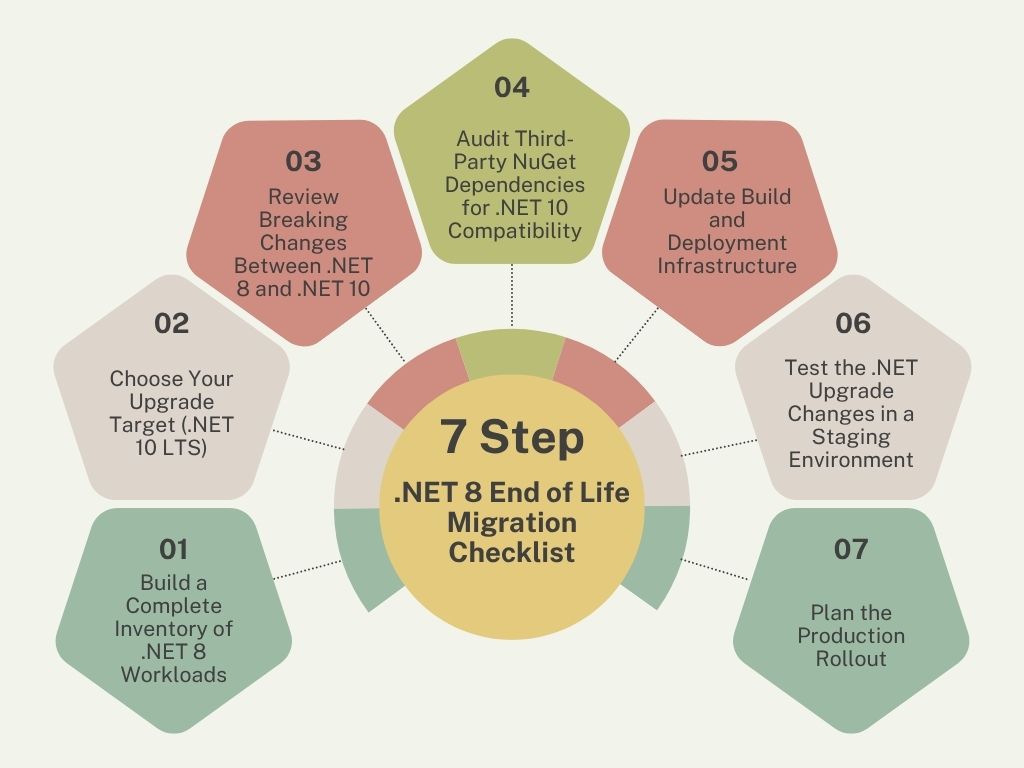
The 7-Step .NET 8 End of Life Migration Checklist
Here is a checklist of all the steps that your team needs to take before .NET 8 reaches end of life in November 2026.
1. Build a Complete Inventory of .NET 8 Workloads
The first step in planning is knowing exactly what is running on .NET 8. List every application, microservice, Azure Function, background worker, and console tool currently running on .NET 8. Include the owner, deployment environment, and business criticality for each one.
Teams often find forgotten workloads during this step, like an internal dashboard nobody has touched in a year, a job runner owned by a team that has since been reorganized, or a console tool the last developer left behind. These are the workloads most likely to miss the .NET 8 end of life deadline.
Check each project’s TargetFramework property in the .csproj files. CI/CD logs and container registries can fill in gaps for services that are not well documented.
2. Choose Your Upgrade Target (.NET 10 LTS)
For most enterprise teams, .NET 10 is the right destination. It is the current LTS release, supported until November 2028, and includes performance improvements in the runtime, ASP.NET Core, and EF Core that benefit backend workloads.
You can even upgrade your .NET version to .NET 10 from .NET 8, as it is supported and documented. Your team does not need to step through .NET 9. Microsoft’s guidance for LTS-to-LTS upgrades treats this as the standard path.
If you cannot move straight to .NET 10, which may happen because of a third-party library, a Windows-specific dependency, or an internal framework that needs work first, decide on the interim version your team will land on first, and note why you are stopping there. A migration plan without a clear target will drag on.
What You Get by Moving to .NET 10:
|
Capability
|
.NET 8 (LTS)
|
.NET 10 (LTS)
|
|
Support ends
|
Nov 10, 2026
|
Nov 2028
|
|
C# version
|
C# 12
|
C# 14
|
|
ASP.NET Core
|
Blazor unified model, minimal APIs, rate limiting
|
Improved Blazor rendering, OIDC/Entra ID improvements
|
|
EF Core
|
EF Core 8
|
EF Core 10 with improved query translation
|
|
Runtime performance
|
Baseline for LTS
|
Continued throughput and GC improvements
|
For a detailed overview on how to upgrade to the latest .NET version, visit this blog.
3. Review Breaking Changes Between .NET 8 and .NET 10
Breaking changes are where migrations slow down. Your team should review:
- Runtime and BCL changes that affect your codebase.
- ASP.NET Core changes in middleware, authentication, and minimal APIs.
- EF Core behavioral changes in query translation and migrations.
- Deprecated APIs that now throw or return different values.
Microsoft publishes a consolidated list of breaking changes for each release. Assign a senior .NET developer from your team to go through that list against your codebase before any work starts. What you need here is a written document listing what breaks and how much work it will take to fix.
4. Audit Third-Party NuGet Dependencies for .NET 10 Compatibility
This is the step where most .NET 8 migration projects hit delays they did not plan for. Every NuGet package in your solution needs to be checked for .NET 10 compatibility.
Run dotnet list package --outdated and dotnet list package --vulnerable on every solution. Flag any package that has not shipped a version targeting net10.0 or netstandard2.1. For abandoned packages, identify replacements now while you have time to evaluate options.
Pay close attention to closed-source dependencies from vendors. Some enterprise libraries ship on slower release cycles, and waiting for a vendor update in October 2026, just a month before the .NET 8 end of life deadline, is not a good idea.
5. Update Build and Deployment Infrastructure
Your pipelines need to be updated before the migration code gets written. That includes:
- Build agents running the .NET 10 SDK
- Docker base images updated to
mcr.microsoft.com/dotnet/aspnet:10.0. - IaC templates (Bicep, Terraform) referencing .NET 10 runtime versions for Azure App Service, Functions, and Container Apps.
- Kubernetes manifests updated with the correct runtime images.
- Static analysis tools like SonarQube and Snyk updated to parse the new target framework.
This step runs longer than it looks. Plan a full sprint, because infrastructure and deployment updates are what the rest of the migration depends on.
6. Test the .NET Upgrade Changes in a Staging Environment
A .NET upgrade can pass every test in your pipeline and still break in production. This is the classic .NET upgrade pattern.
Before the upgraded version goes live, run it through a staging environment that mirrors your production setup, with the same traffic patterns, database versions, and external services. Put it under load, run all your tests against it, and check that your logs and monitoring still work the way they did on .NET 8.
For teams on microservices, upgrade one service at a time and verify inter-service communication works as expected. Contract tests are particularly valuable here, since services on .NET 8 and .NET 10 will be communicating with each other throughout the migration window.
7. Plan the Production Rollout
Every service running on the .NET runtime will need to be redeployed during this step, which makes it the riskiest part of the migration. Most teams prefer to roll out a .NET version upgrade in phases, instead of doing it all at once. Your rollout plan should include:
- A deployment order that starts with lower-risk services.
- A rollback procedure that kicks in if monitoring shows problems after deployment.
- A monitoring window after each deployment, with on-call engineers ready to respond.
- Communication to stakeholders on the upgrade timeline and any expected downtime.
Blue-green or canary deployment patterns reduce risk considerably. If your team has not used them before, a runtime upgrade is a strong reason to set them up. Teams that do not have the in-house capacity to run a phased rollout on this scale often hire .NET developers to handle the migration window, while your internal teams take care of the rest of the work.
Common Mistakes That Delay .NET 8 End of Life Preparation
- Starting the inventory too late: Teams assume they know every .NET 8 workload in production. They rarely do. Forgotten Azure Functions and abandoned job runners surface only during a full audit.
- Treating vendor dependencies as a last-minute check: Closed-source NuGet packages ship on slower release cycles. Waiting until October 2026 to check vendor compatibility leaves no time for alternatives.
- Assuming .NET 9 buys more time: .NET 9 reaches end of support on the same day as .NET 8. Upgrade to .NET 10 directly.
- Skipping infrastructure updates until after the code is ready: Build agents, Docker images, and IaC templates all need .NET 10 support before any upgraded code can ship.
Final Note
The window between now and November 10, 2026, is shorter than it looks. Discovery and dependency audits alone can take four to six weeks in a mid-sized engineering organization. If your team has not started planning for the .NET 8 end of life deadline, now is the time to begin.
If you need help planning the migration, auditing third-party dependencies, or executing the upgrade without slowing down delivery, you can take the help of a .NET development company with experience in handling projects that involve migrating enterprise workloads from .NET Framework, .NET Core 3.1, .NET 6, and .NET 8 to current LTS releases.
Frequently Asked Questions (FAQs)
1. When does .NET 8 reach end of life?
.NET 8 end of life is scheduled for November 10, 2026.
2. Can I upgrade directly from .NET 8 to .NET 10?
Yes. Microsoft’s guidance for LTS-to-LTS upgrades treats this as the standard path. Your team does not need to step through .NET 9.
3. Is .NET 10 LTS?
Yes, .NET 10 is a Long-Term Support release, supported until November 10, 2028.
4. What happens if I keep running .NET 8 after November 2026?
Your applications will continue to run, but Microsoft will stop shipping security patches, bug fixes, and runtime updates. Any new CVE stays unpatched, and the unsupported runtime gets flagged in SOC 2, HIPAA, and PCI DSS audits.
5. How long does a .NET 8 to .NET 10 migration take?
For most mid-sized engineering organizations, four to six weeks for discovery and dependency audits, plus another one to three months for code migration, testing, and phased rollout. Larger or more complex estates can take longer.
6. Should I upgrade to .NET 9 or go straight to .NET 10?
Directly migrate to .NET 10 with .NET migration services. .NET 9 reaches end of support on the same day as .NET 8 (November 10, 2026), so moving to .NET 9 does not buy you any additional time.
In case you have found a mistake in the text, please send a message to the author by selecting the mistake and pressing Ctrl-Enter.